
Keep your number. Never miss the job.
Right On Call is an AI receptionist for Canadian businesses. Your line stays on your own number. You decide when the agent answers. After a few rings the AI picks up, books the work, and sends you a text.
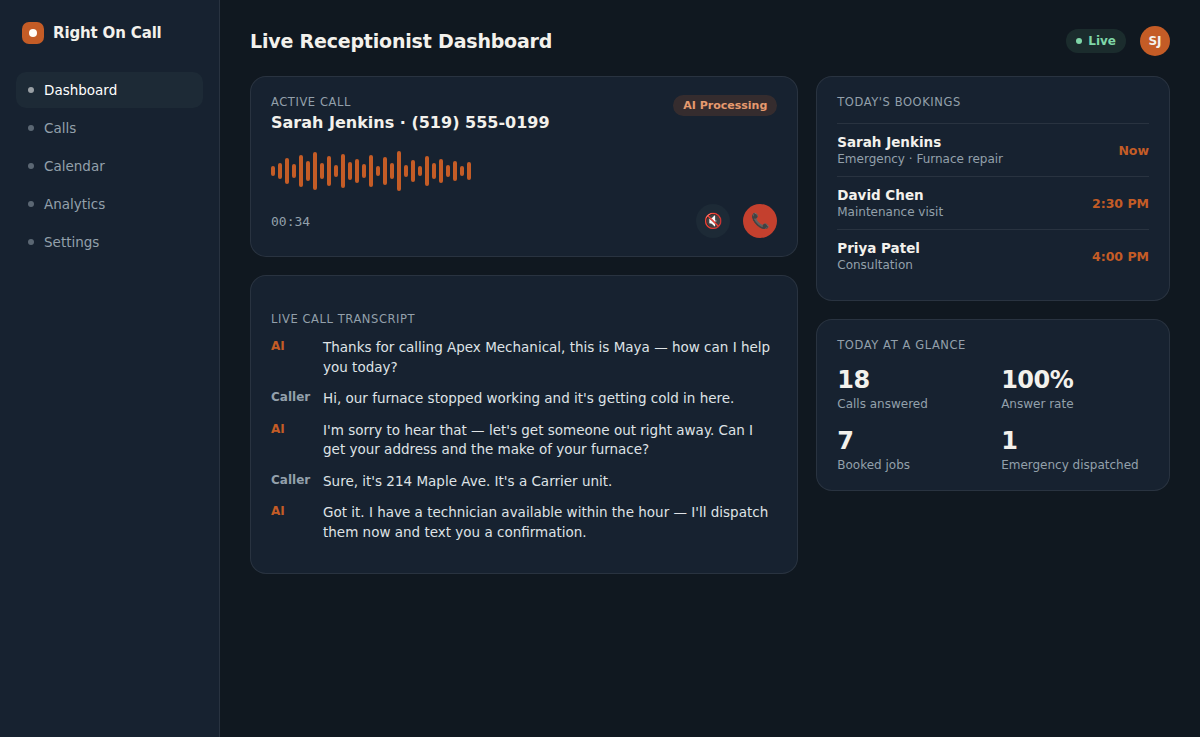
Hear Right On Call handle a call before you commit.
Pick your industry to preview how the AI triages a real scenario, then request a live call and talk to it yourself.
Apex Mechanical
AI receptionist · Maya
This is a scripted sample call, not a recording of a customer. Want to talk to the real thing?
Revenue recovery
What missed calls are actually costing you
A planning estimate: missed calls × a realistic recovery rate × your average ticket, minus a Right On Call month.
Estimated recovery
$5,434 CAD/month
About 19.1 recovered jobs · $65,208 CAD / year
- Right On Call month
- $199 CAD
- Net per month
- $5,235 CAD
- vs monthly plan
- 27× recovered
Estimate only. Not a guarantee. Recovery assumes a live answer on calls that currently hit voicemail. Actuals depend on your mix of emergencies, quotes, and junk calls.
What you get besides a picked-up phone
Everything else, labelled live or on request: features and integrations.
How it works for your kind of business
A plumber and an accounting firm miss different calls. Pick yours to see what the receptionist does with them.
Four trades, four different first questions
A furnace call starts with whether there is no heat at all or it is running but not keeping up. A plumbing call starts with where the water is and whether it is still spreading. An appliance call starts with which appliance and what brand. A sparking outlet skips the questions and goes straight to a fixed safety script. Right On Call asks the one that fits the call in front of it, so your tech has the answer that matters before the truck leaves.
Learn more about Home Services- Urgent or routine, sorted against your own emergency list
- Brand and model on the call, a photo request by text after it
- Urgent jobs texted to your on-call phone right away
Hear the voices before you pick one.
Same script, 6 voices, so the only thing that changes is who answers. Pick one during setup and we put it on your line. Switching later is a config change, not a rebuild.
The script
“Thanks for calling Apex Mechanical, this is name, the AI receptionist. I can book a technician, check that you're in our service area, or get a message to the on-call team. What's going on today?”
Voices by ElevenLabs, rendered on the same model the phone line uses. These are clips of the script above, not recordings of real calls, and a phone line carries narrower audio than your speakers, so every voice sounds a little flatter on a call. Samples are in English. Want a voice not listed here, or to hear one in French first? Ask during setup.
English or French, whichever the caller starts in.
If a caller starts in French, the receptionist answers in French and stays there for the whole call. This website is in English; the phone line is bilingual. Other languages can be trained as part of a build.
Bonjour, comment puis-je vous aider aujourd'hui?
Hi! I can book that appointment for you right now.
Parfait, je réserve votre rendez-vous pour demain.
Integrations
Sits on the number your leads already call
Google LSA, HomeStars, and Yelp ring the number on your listing, so answering that number is the whole integration. Jobber connects from the dashboard. Housecall Pro is built during setup, and each card says which is which.
- Google LSALive today
Local Services Ads already ring the number on your Google listing. We sit on that line, so the lead is answered instead of going to voicemail.
- HomeStarsLive today
Ontario homeowners search HomeStars for a pro. Your AI receptionist answers the number HomeStars publishes for your business, so a click-to-call lead is answered instead of going to voicemail.
- YelpLive today
Calls from your Yelp page ring your public number and the receptionist picks up. Messages in the Yelp inbox stay there; we don't read them.
- Google CalendarLive today
Live today through Cal.com or Calendly. Direct Google OAuth, skipping the middle layer, is a scoped setup.
- Cal.comLive today
Default booking calendar. Connects through to Google, Outlook, and iCloud so the slot is real. Visit length is the event type you Save in the dashboard.
- TwilioLive today
A local number is included on every paying plan. SMS confirmations, photo intake, and escalation texts run on it.
- JobberLive today
Connect Jobber from the dashboard. The call can create a client and a job. It doesn't assign a technician. Not a Jobber App Marketplace listing.
- Housecall ProOn request
Booking and job notes into Housecall Pro for shops already on it. Housecall Pro only opens its API on its MAX plan, so the shop needs to be on MAX.
Security & compliance
Treat the phones like customer data, because they are
PIPEDA-aligned
Minimum data, recordings belong to you, no list-selling.
Not used to train models
Your calls are for dispatch and booking, not foundation-model training.
You can kill the line
Dashboard switch, encrypted tokens, isolation per client.
Onboarding
Hear it in 24 hours. Live within 7 days.
You hear a first working version of your receptionist within 24 hours of a complete onboarding pack, and the target is to have you live within 7 days. When it runs longer, the pack is usually missing hours, coverage rules, or on-call numbers.
Day 0
You send the onboarding pack
Hours, service area, emergency rules, on-call numbers, greeting, and the tools you already use. The clock starts when this is complete, not when you first email us.
Day 1
You hear a first version
Script, triage, dispatch rules, and the calendar or Jobber hook. Within 24 hours of a complete pack you hear a working first pass and mark what sounds unlike your shop.
Days 2–5
We wire the phones
Included Twilio number, recording disclosure, SMS templates, dashboard access, and a private test line so you can argue with it before customers do.
Days 6–7
You go live
Forward the public number, publish the included Twilio number, or port. We sit on the first real calls with you and tune anything that feels off. A field-service or property-system integration can take longer.
Want the wiring diagram? How the technology actually works
Three ways to run the line.
Minutes included, setup paid once, no term. Pay for the year and the setup is waived. Prices in Canadian dollars, plus HST.
Essential
One line, answered around the clock.
$199CAD /month
Plus $699 CAD setup, paid once. No term.
200 minutes a month included
Then $0.70 CAD a minute, billed to the second
- 24/7 answering, emergency triage, and dispatch
- Books your calendar, or creates the job in Jobber
- SMS confirmation and photo intake
- English and French on every call
- Built for your trade, tuned after launch
Managed
RecommendedA crew on rotation and a job system.
$449CAD /month
Plus $1,299 CAD setup, paid once. No term.
500 minutes a month included
Then $0.60 CAD a minute, billed to the second
- Everything in Essential
- Calls land as jobs in your ServiceTitan, Housecall Pro, AppFolio, or Buildium (one system, built in setup)
- Roster-aware dispatch and after-hours rules
- One extra language, and lead callback once it ships
- A named contact and quarterly script reviews
Enterprise
Several locations, or a security review.
Custom
Scoped per account and quoted in writing.
Volume minute pricing
One bill across every location
- Many locations and numbers on one account
- Integrations scoped across your whole stack
- Security review, DPA, and questionnaires answered
- Response targets agreed in writing
30-day money-back guarantee, on every plan.
Ask within 30 days of going live on your number, for any reason, and we refund the setup fee and your first month. On annual, the whole year. Only minutes over your plan and separately quoted integration work stay billed.
- No term on monthly
- Minutes billed to the second
- Going over never changes your plan
Written for Ontario shop owners
Right On Call
Read article
Right On Call
Read article
Right On Call
Read article